Karaoke-app
Control sheet
Author: ce-itcr
Project: karaoke-app
Approval Date: 09/18/2021
Change Log
|
Version |
Cause of change |
Responsible for the change |
Date of change |
|---|---|---|---|
| 001 | Initial Version | Angelo Ortiz Vega | 09/21/2021 |
Development team
Angelo Ortiz Vega: @angelortizv
Agustín Venegas Vega: @ JoseAgus00
Jonathan Esquivel Sánchez: @ jesquivel48
Presentation
This documentation is associated with Project I - Karaoke! of the Software Architecture course (CE5508) of the Technological Institute of Costa Rica. Its general idea is to design software to provide a karaoke service.
Objectives
General objective
- Build a web application for karaoke.
Specific objectives
- Learn about the C4 model to document software architecture.
- Design a web application that consumes web services.
Description of the problem
Among the main requirements (at a very general level) that have been foreseen are the following:
- The user must authenticate through Forms and the system validates it against its own user database.
- User can add / delete / modify existing songs and lyrics. This is only allowed for premium users.
- The user must be able to search through a list of songs, the one they want to play. You can search for it by song name, artist, album, and lyric snippets.
- The user can play a song for which the Karaoke application will stream the audio and synchronize the lyrics so that the user can sing to the rhythm of the music
Functionalities Diagram
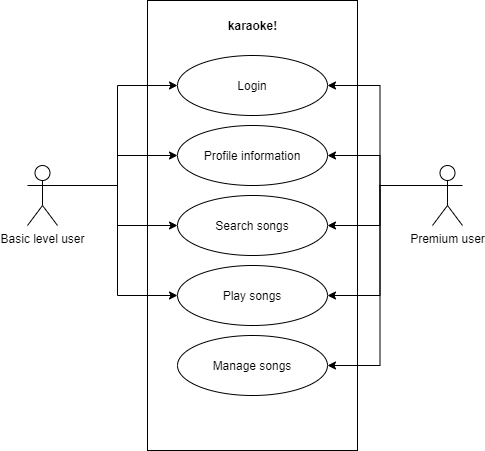
Working application
Check out the live application -> https://karaoke-ceitcr.netlify.app/
If you need to test functionalities for different users, log in with the following credentials:
Basic level user:
- username: basic
- password: basic1
Premium user (With this type of user, you can edit/delete and add songs to the database):
- username: premium
- password: premium1
Design and implementation decisions
|
Decision |
Justification |
|---|---|
| Programming Languaje | Javascript: karaoke is a web application, Javascript is chosen as the main language since it has endless advantages, among the main ones could be described: Speed, Simplicity, Popularity, Compatibility, Server Load, Simple Interfaces, Versatility and Constant Updates. |
| Frameworks / Toolkits |
React: In the first instance, React is a complete library, suitable for many different types of projects. It allows us an agile, orderly development with a maintainable architecture, focused on components and that offers us great performance. It is used to develop web applications in a more orderly way and with less code. Allows views to be associated with data, so if the data changes, the views change too. NodeJS: In general we can say that Node.js is a Javascript interpreter that works on the server side and completely changes the notion of how it should work. What is innovative about this runtime environment is that, traditionally, programmers work using JavaScript on the client side but are looking for a new language on the server side; With Node.js this would no longer be necessary, as it is a Javascript interpreter, the same programming language could be used on both sides. Express: Express is the most popular Node web framework, and is the underlying library for a large number of other popular Node web frameworks. Provides mechanisms for: Writing request handlers with different HTTP verbs in different URL paths (routes). |
| Database technology | Mongodb: The main reason why Mongodb is chosen as the database technology refers to scalability, both vertical and horizontal. Scalability is the need for the database to adapt, increasing its size depending on the information it stores, the users who will access it and other aspects. Vertical scalability refers to memory and CPU usage. Horizontal scalability refers to the ability of MongoDB to create new nodes, since it is a distributed system in which new nodes can be incorporated, as if they were replications of MongoDB itself. This allows much better performance for the application. |
| Organization / layout of code projects |
The project is divided into two main stages: Backend - Node Js and Frontend made with React.
Frontend: 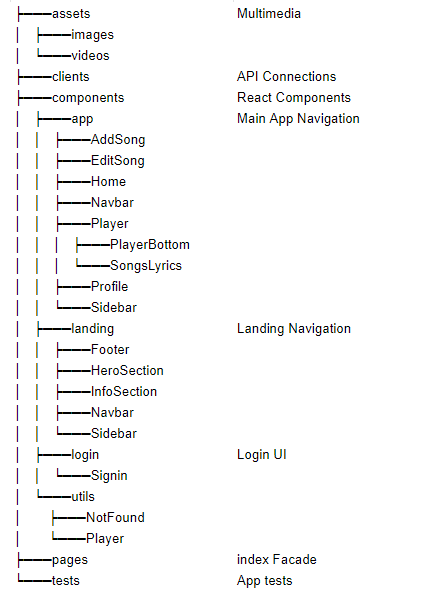
Backend: 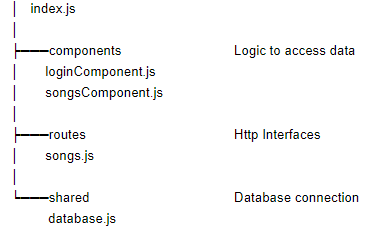
|
| Branching |
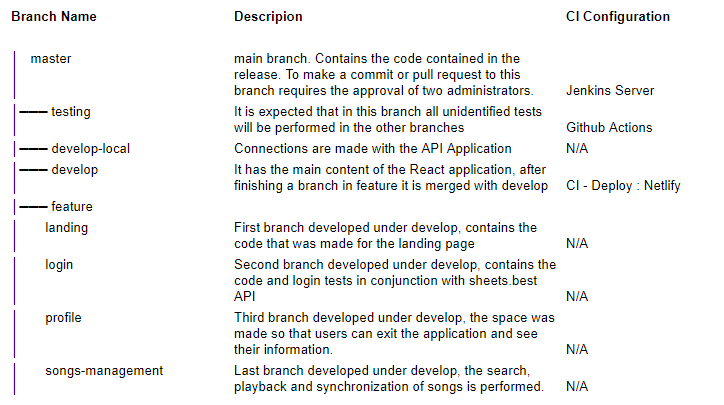
|
Description of the architecture model
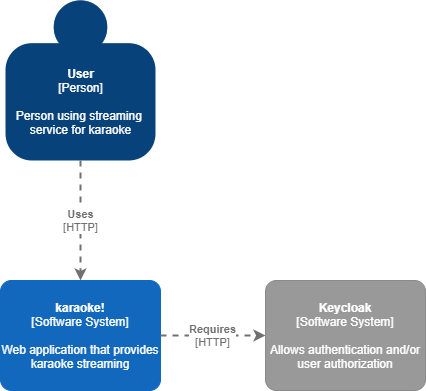
First Level Diagram (Context Diagram)
Level 1, a system context diagram, shows the software system you are building and how it fits into the world in terms of the people who use it and the other software systems with which it interacts.
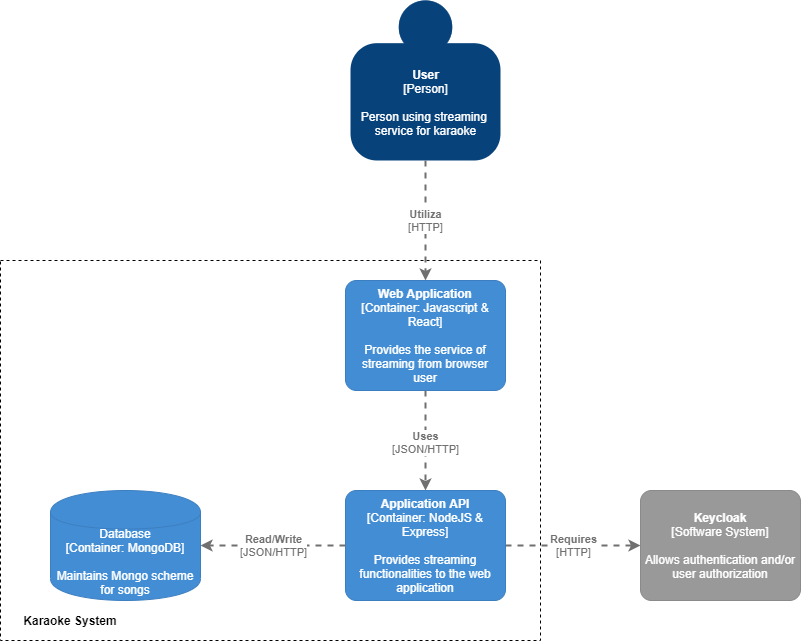
Second level diagram (Container diagram)
Level 2, a container diagram, expands the software system and shows the containers (applications, data warehouses, microservices, etc.) that make up this software system. Technology decisions are also a critical part of this diagram.
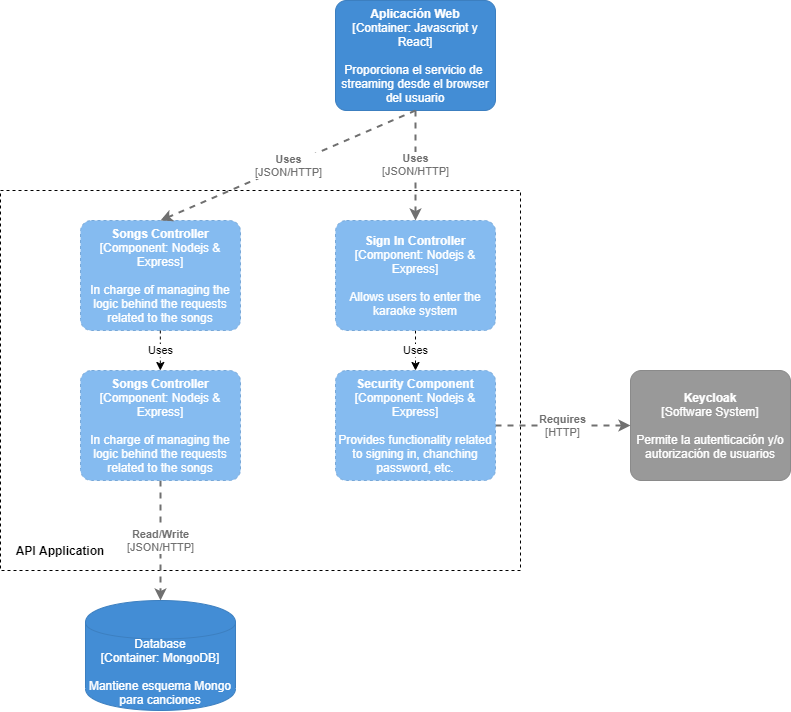
Third level diagram (Component diagram)
Level 3, a component diagram, expands an individual container to display the components it contains. These components must be mapped to actual abstractions (for example, a tag grouping) based on your code.
Fourth level diagram (Code)
Finally, if you really want or need it, you can extend an individual component to show how this component is implemented.

Support and Contact
If you want to contact us visit the site on Github for more information ce-itcr